TSX & Typed Components in React: Props Interfaces, State Typing, Functional & Class Components
## 1. Problem Statement
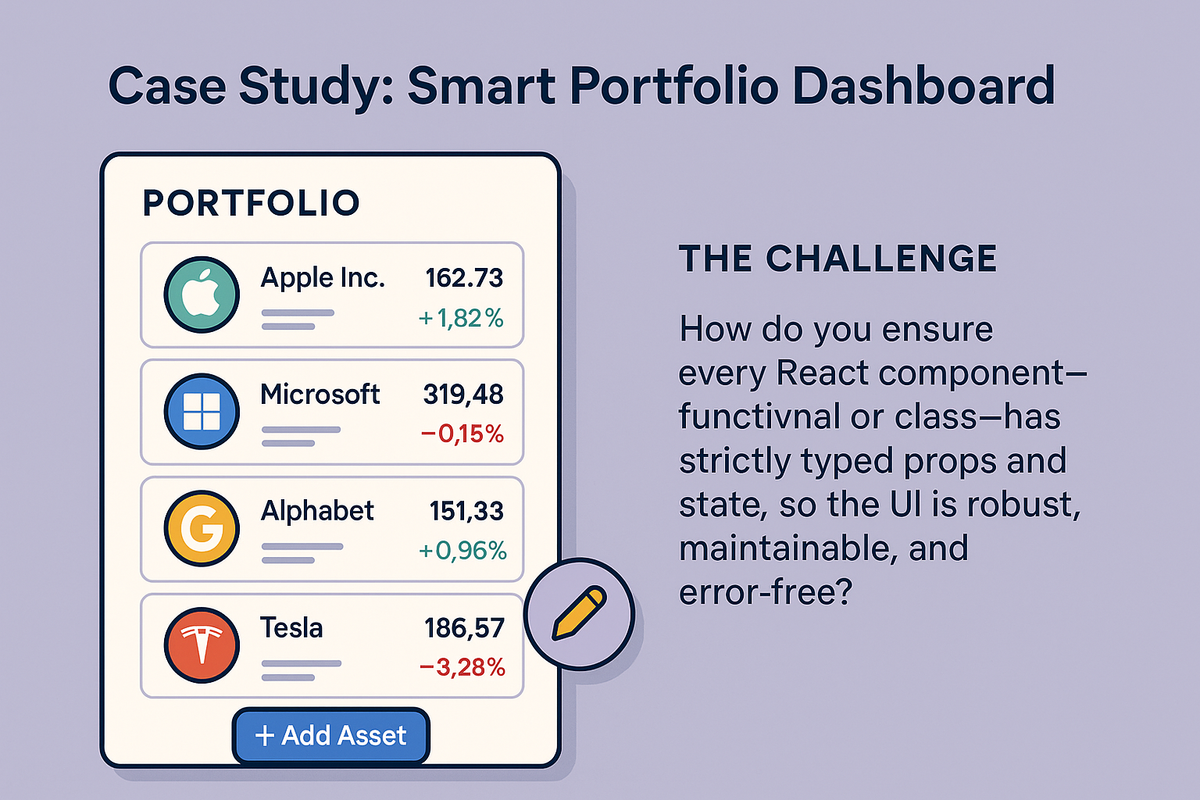
## **Case Study: Smart Portfolio Dashboard**
You’re building a financial portfolio dashboard:
- Each asset card must show a name, symbol, current value, and percentage change—all with strict type safety.
- Users can add, remove, or update assets, and the UI must prevent type errors (e.g., mixing up numbers and strings, missing props).
- Some components are stateless (just display data), others manage complex, interactive state (adding assets, editing values).
- The team wants to avoid runtime bugs from missing or mistyped props, and ensure state is always managed correctly.
**The challenge:**
How do you ensure every React component—functional or class—has strictly typed props and state, so the UI is robust, maintainable, and error-free?
----------
## 2. Learning Objectives
By the end of this tutorial, you will:
- Define and use **props interfaces** for both functional and class components.
- Strongly type component state (with `useState`, `useReducer`, and class state).
- Know when to use interfaces vs. type aliases for props/state.
- Understand typing for event handlers, children, and generics.
- Compare typing in functional vs. class components.
- Avoid common pitfalls like implicit `any`, missing props, and state mutation.
----------
## 3. Concept Introduction with Analogy
## **Analogy: The Portfolio Ledger**
- **Props** are like asset forms: Each field (name, value, change) must be filled out with the correct type—no mixing up numbers and text.
- **State** is the running ledger: It tracks all changes and must always be accurate and up-to-date.
- **Functional Components** are like calculators: They process data quickly, and can keep memory (state) with hooks.
- **Class Components** are like portfolio managers: They manage more complex workflows, with a clear structure for their data and methods.
**TypeScript is the auditor:**
It catches every type mismatch before it becomes a costly bug.
----------
## 4. Technical Deep Dive
**A. Typing Props: Interfaces and Type Aliases**
**1. Defining Props with Interfaces**
- Use `interface` or `type` to declare the shape of props.
- Interfaces are extensible and ideal for public APIs.
```js
// AssetCard.tsx
interface AssetCardProps {
name: string;
symbol: string;
value: number;
change: number;
onRemove: (symbol: string) => void;
}
```
**2. Using Type Aliases for Props**
```js
- Type aliases are great for unions or when you want to combine types.
type AssetType = 'stock' | 'bond' | 'crypto';
type AssetProps = {
type: AssetType;
value: number;
};
```
**3. Optional and Default Props**
- Use `?` for optional props.
- Provide default values in destructuring or with `defaultProps` (class components).
```js
const AssetCard: React.FC = ({
name,
symbol,
value,
change,
onRemove
}) => (
 **The challenge:**
How do you ensure every React component—functional or class—has strictly typed props and state, so the UI is robust, maintainable, and error-free?
----------
## 2. Learning Objectives
By the end of this tutorial, you will:
- Define and use **props interfaces** for both functional and class components.
- Strongly type component state (with `useState`, `useReducer`, and class state).
- Know when to use interfaces vs. type aliases for props/state.
- Understand typing for event handlers, children, and generics.
- Compare typing in functional vs. class components.
- Avoid common pitfalls like implicit `any`, missing props, and state mutation.
----------
## 3. Concept Introduction with Analogy
## **Analogy: The Portfolio Ledger**
- **Props** are like asset forms: Each field (name, value, change) must be filled out with the correct type—no mixing up numbers and text.
- **State** is the running ledger: It tracks all changes and must always be accurate and up-to-date.
- **Functional Components** are like calculators: They process data quickly, and can keep memory (state) with hooks.
- **Class Components** are like portfolio managers: They manage more complex workflows, with a clear structure for their data and methods.
**TypeScript is the auditor:**
It catches every type mismatch before it becomes a costly bug.
----------
## 4. Technical Deep Dive
**A. Typing Props: Interfaces and Type Aliases**
**1. Defining Props with Interfaces**
- Use `interface` or `type` to declare the shape of props.
- Interfaces are extensible and ideal for public APIs.
```js
// AssetCard.tsx
interface AssetCardProps {
name: string;
symbol: string;
value: number;
change: number;
onRemove: (symbol: string) => void;
}
```
**2. Using Type Aliases for Props**
```js
- Type aliases are great for unions or when you want to combine types.
type AssetType = 'stock' | 'bond' | 'crypto';
type AssetProps = {
type: AssetType;
value: number;
};
```
**3. Optional and Default Props**
- Use `?` for optional props.
- Provide default values in destructuring or with `defaultProps` (class components).
```js
const AssetCard: React.FC
**The challenge:**
How do you ensure every React component—functional or class—has strictly typed props and state, so the UI is robust, maintainable, and error-free?
----------
## 2. Learning Objectives
By the end of this tutorial, you will:
- Define and use **props interfaces** for both functional and class components.
- Strongly type component state (with `useState`, `useReducer`, and class state).
- Know when to use interfaces vs. type aliases for props/state.
- Understand typing for event handlers, children, and generics.
- Compare typing in functional vs. class components.
- Avoid common pitfalls like implicit `any`, missing props, and state mutation.
----------
## 3. Concept Introduction with Analogy
## **Analogy: The Portfolio Ledger**
- **Props** are like asset forms: Each field (name, value, change) must be filled out with the correct type—no mixing up numbers and text.
- **State** is the running ledger: It tracks all changes and must always be accurate and up-to-date.
- **Functional Components** are like calculators: They process data quickly, and can keep memory (state) with hooks.
- **Class Components** are like portfolio managers: They manage more complex workflows, with a clear structure for their data and methods.
**TypeScript is the auditor:**
It catches every type mismatch before it becomes a costly bug.
----------
## 4. Technical Deep Dive
**A. Typing Props: Interfaces and Type Aliases**
**1. Defining Props with Interfaces**
- Use `interface` or `type` to declare the shape of props.
- Interfaces are extensible and ideal for public APIs.
```js
// AssetCard.tsx
interface AssetCardProps {
name: string;
symbol: string;
value: number;
change: number;
onRemove: (symbol: string) => void;
}
```
**2. Using Type Aliases for Props**
```js
- Type aliases are great for unions or when you want to combine types.
type AssetType = 'stock' | 'bond' | 'crypto';
type AssetProps = {
type: AssetType;
value: number;
};
```
**3. Optional and Default Props**
- Use `?` for optional props.
- Provide default values in destructuring or with `defaultProps` (class components).
```js
const AssetCard: React.FC